Announcement
Analytics for LS Central 2025.2 released
Posted on 10/22/2025 12:00:00 PM
In this version of Analytics for LS Central the focus has been on adding a new Finance Module to the data warehouse and pipelines and create a new Finance Analytics report template.
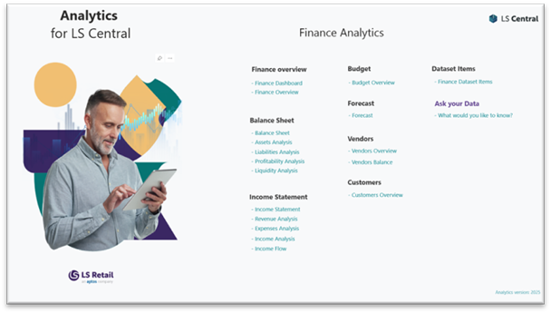
It is designed to help users quickly assess the organization's financial health, operational efficiency, and growth trends. The report draws on general ledger, customer, vendor, and budget data to present a comprehensive snapshot of business results. One possible application is to support executive decision-making by highlighting areas of strength and potential risk within the company's finances.
We have also created a new dynamic staging process, that utilizes data exported from LS Central SaaS with bc2adls app, and we are now releasing in BETA.
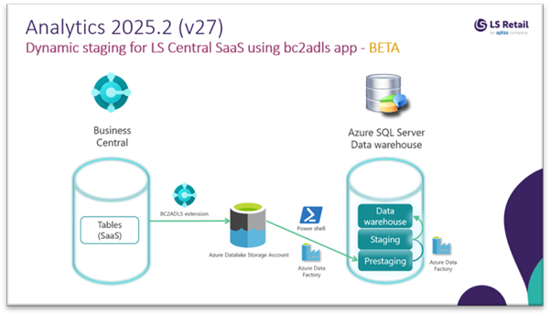
The new staging process uses BC2ADLS extension app to export data from LS Central SaaS into Azure storage account. From there we use Power shell to automatically create the scripts needed to create and load data into prestaging tables. Azure data factory and SQL Merge is then used to move the data from prestaging to staging and after that the prestaging tables are emptied so they only hold the deltas, and only for a short period of time. By merging into staging we only keep the latest version of each fact line in staging instead of multiple lines that often caused issues when loading data into the DW star-schema tables.
And as always, we have fixed issues based on reports from our partners and customers.
If you are interested in knowing more about Analytics and the updates in our latest version, please consult the release notes in the LS Central online help.
To get started with Analytics today you can review the onboarding documentation.
Best regards,
The Analytics Team