SaaS: Resources for migration and new customers
This page provides resources that our partners need to migrate existing Business Central (BC) customers to SaaS and onboard new customers directly into the cloud. Whether you're focused on technical migration or sales strategy, you'll find the tools and insights to ensure a smooth transition and maximize the benefits of SaaS. Note that we will update the material and information on this SaaS resouces page on a regular basis.
For all enhancement requests and feedback around the page please contact SaaSResourcePage@lsretail.com
LS Central SaaS Onboarding process
- When implementing LS Central in SaaS for the first time, partners go through an Onboarding process.
- This process includes completing the steps to become an Indirect Reseller under Microsoft’s CSP program. Once that is done, you will be invited to an onboarding session to prepare your technical team for the first implementation.
- Complete the CF-900 training before placing an order. More information on Cf-900 on LS Retail Academy On-Demand
- The goal of the onboarding process is to ensure that partners are fully prepared to implement LS Central in SaaS successfully. For more details on the onboarding process, please visit our Onboarding LS Central in SaaS page.
LS Retail Academy On-Demand is an essential learning platform designed to accelerate partner onboarding to LS Central SaaS. It provides flexible, self-paced training that covers everything from product fundamentals to advanced configuration and implementation best practices.
By leveraging LS Retail Academy On-Demand, partners gain:
- Comprehensive Knowledge: Access to structured courses on LS Central SaaS features, architecture, and deployment
- Practical Skills: Hands-on exercises and real-world scenarios to build confidence in delivering SaaS solutions.
- Flexibility: Learn anytime, anywhere, without disrupting daily operations
- Faster Time-to-Value: Reduce onboarding time and start delivering successful projects sooner
For partners, this resource is critical to ensure smooth migrations, consistent quality in implementations, and readiness to meet customer expectations in a SaaS-first world.
Not sure where to start? Contact the Partner Development Team.
If you are unsure where to start the SaaS Onboarding process, please contact our Partner Development Team by sending an e-mail to pops@lsretail.com
The Partner Development team is responsible for recruiting, onboarding and enabling partners, contract management for partners and end-users in collaboration with the legal team. They also take care of the Partner Program, the LS Retail Portal and its development, access for partners to the Portal and Business Hub.Partner Development establishes a relationship between the partner and LS Retail within the Microsoft Cloud Solutions Provider, and ensure that partners meet LS Retail's requirements.
 Overview
 Useful links
How to answer common questions from customers related to SaaS?
How can I accurately compare the total cost of a SaaS subscription with the full cost of running Business Central on-premises?
We’ve created a pricing comparison calculator that helps you demonstrate the true total cost of ownership by comparing Azure‑hosted on‑premises deployments with Business Central SaaS—using both minimal and fully recommended hosting scenarios—so you can have more meaningful SaaS pricing conversations with your customers. Try the pricing comparison calculator
What deployment options are available in SaaS?
In SaaS you can either deploy the POS online or offline, and you can also combine the two options. Different architecture for LS Central SaaS
Steps to order customer subscription for LS Central in SaaS
|
How to acquire a development or test tenant in SaaS?
How to answer common questions from customers related to SaaS? Our page for SaaS Objection Handling serves as a quick-reference guide for partners during sales and pre-sales engagements. Its purpose is to equip you with clear, accurate, and concise responses to the most common questions and concerns raised by prospective customers. By using this resource, you can confidently communicate the value of our solution and the robustness of the platform.
Testimonies from customers that have migrated to LS Central in SaaS In SaaS you can either deploy the POS online or offline, and you can also combine the two options. Learn more about different architecture for LS Central SaaS. LS Central performance tools To help partners evaluate and demonstrate SaaS performance, LS Retail provides two customizable per‑tenant tools: the LS Central Performance Tool (LSCPT), which generates LS‑specific BCPT test suites and master data for performance testing, and the LS Central Replenishment Data Creator, which produces realistic test data for validating SaaS behavior under real‑world conditions. Both tools operate independently of the LS Central release cycle and are available via GitHub upon request. Learn more about LSCPT and the Data Creator.
The Microsoft Concierge Program is a pre-sales initiative that helps partners migrate large customers to Business Central SaaS. The program is delivered by the Business Central Concierge team—cloud solution architects who work directly with partners, customers, and Microsoft sales teams to provide technical guidance and ensure smooth SaaS migrations. Cloud Accelerator Program (CAP)
LS Retail Professional Services Our professional services team is here to complement and support your migration efforts, offering flexible collaboration options to ensure a smooth and successful transition to LS Retail SaaS. We understand that every partner has unique needs, so we work closely with you at every stage—whether through strategic planning, hands-on technical assistance, or specialized training. Our goal is to strengthen your expertise and provide additional resources wherever they add value. How to contact Professional Services LS Retail has a specific Offer and promotion page on our Portal where we inform if there are any ongoing promotions and FAQ page for each promotion. Additionally, for partners, we have provided on our portal a calculation tool to help partners determine what is needed for customers to be eligible for the BTC3 offer, The calculation tool and instructions on how to use it can be found on the front page in our Operational Guidelines. Please contact Licenses to get an accurate quote of the new monthly cost. |
How to create a new Business Central environment in SaaS
Our LS Central Implementation Guide includes a dedicated SaaS Onboarding – Step‑by‑Step Guide that outlines the full process for creating a new Business Central environment in SaaS and installing LS Central. If you already have an existing BC environment and only need LS Central installed, the guide covers that also.
How partner access the customer environment
The SaaS Onboarding – Step‑by‑Step Guide, step 5, covers the steps on the recommended way partners can gain access to their customers' environment in SaaS.
Managing Users and Licenses in LS Central SaaS
User and license management in LS Central SaaS is covered in detail in our LS Central Implementation Guide. The SaaS Onboarding — Step-by-Step Guide references this guide in Step 6, pointing you directly to the chapter that walks you through everything you need to set up and manage users and licenses correctly.
How to implement LS Central in SaaS
In the LS Central Implementation guide we share best practices when implementing LS Central in SaaS. It is a step-by-step guide on the setup of different deployment options of LS Central in SaaS, guidance administering Business Central environments in SaaS along with best practices when supporting your customer in SaaS.
LS Central Migration tool
A tool to help you upgrade your on-premises LS Central, version 14 or later, to the latest version
- Download the LS Central Migration tool – version 1.0.0 Password: ec40snZJ8+rjJ@N7yy5a
- Step-by-step documentation following Microsoft guidelines
- Relying on LS Central Migration Tools for some tasks to be automated
Microsoft Cloud Migration tool
A tool to help you migrate your on-premises database to the SaaS environment.
Cloud Accelerator Program (CAP)
Do you need support in your SaaS implementation?
- Sessions with the CAP Team are free of charge.
- The program focuses on engagement with our partners through online session, that is addressing SaaS related topics.
Book a free 30-min CAP session
How to extend LS Central in SaaS
LS Retail partners cannot modify the core Business Central or LS Central code. However, specific customer requirements can still be met through extensions. For detailed guidance, please refer to the LS Retail Implementation Guide on extending LS Central in a SaaS environment.
Integrations in LS Central SaaS
LS Pay gives access to numerous types of PSPs and their various technical stacks and gateways.
eCommerce for LS Central is a software enhancer on top of the LS Central solution, enabling real-time eCommerce integrations in a unified commerce manner.
Connect to Mobile Inventory in SaaS without the Commerce server
Many of our customers have already transitioned to LS Central SaaS and shared their positive experiences with us. If you're interested in learning about SaaS migration stories, feel free to explore the examples below.
|
Hardware franchise - Vietnam |
Fast-food franchise - Philippines |
Fast-food franchise - Greece |
Beauty and cosmetics - Germany |
 Beauty and cosmetics - Norway |
Fitness and health - England |
Chain of coffee shops - Vietnam |
|

For more general insights on SaaS implementations, please check here.
Before you can start selling LS Central SaaS, you must follow the LS Retail Indirect reseller process with our partner operations team.
For many organizations, the true cost of their solutions is unclear, hence making it difficult to compare the total cost of ownership
Main points to mention what is included in the SaaS solution are:
- Infrastructure
- Database
- Support
- Energy
- Security
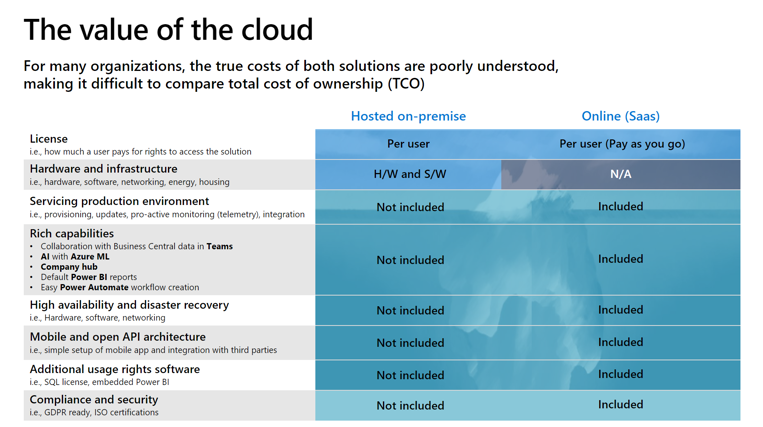
With LS Central SaaS you get both the complete functionality of Microsoft Dynamics 365 Business Central, and all the base functionality part of LS Central, such as LS Central for retail, LS Central for restaurants and so on.
Add on modules like Bookings, Staff Management, eCommerce and LS Pay are all licensed in the same manner as in LS Central on Business Central on-prem Perpetual licenses
-
For information on cloud solution licensing and availability see the FAQ’s here https://portal.lsretail.com/Partner-Essentials/Cloud-Solutions-licensing-and-availability
-
For information on placing an order and operational guidelines, see here: https://portal.lsretail.com/Partner-Essentials/Operational-Guidelines
- LS Central will be offered as SaaS (in-cloud), on-premises and hybrid. Customer can start in the cloud, but if their business demands it, they can move to on-premises at a later point
- Customers can also start on-premises and move to the cloud whenever they want.
- The hybrid deployment model will combine the cloud and on-premises offering. An example is an on-premises LS Central in-cloud deployment, with solution enhancers such as LS Recommend or LS Insight deployed in the cloud. This enables the customer to get best of both worlds
Yes, you can still access your data. All your data is your own property no matter if it is in the cloud or in your local server.
You find information on the availability of LS Central local versions on the LS Retail Portal.
Microsoft Dynamics 365 is designed with robust security and compliance features to help organizations meet various regulatory requirements. By leveraging these capabilities, businesses can ensure data protection, adhere to industry standards, and maintain customer trust.
More here: https://aka.ms/d365-compliance-list
Before you can start selling LS Central SaaS, you must follow the LS Retail Indirect reseller process with our partner operations team.
For many organizations, the true cost of their solutions is unclear, hence making it difficult to compare the total cost of ownership
Main points to mention what is included in the SaaS solution are:
- Infrastructure
- Database
- Support
- Energy
- Security
With LS Central SaaS you get both the complete functionality of Microsoft Dynamics 365 Business Central, and all the base functionality part of LS Central, such as LS Central for retail, LS Central for restaurants and so on.
Add on modules like Bookings, Staff Management, eCommerce and LS Pay are all licensed in the same manner as in LS Central on Business Central on-prem Perpetual licenses
-
For information on cloud solution licensing and availability see the FAQ’s here https://portal.lsretail.com/Partner-Essentials/Cloud-Solutions-licensing-and-availability
-
For information on placing an order and operational guidelines, see here: https://portal.lsretail.com/Partner-Essentials/Operational-Guidelines
- LS Central will be offered as SaaS (in-cloud), on-premises and hybrid. Customer can start in the cloud, but if their business demands it, they can move to on-premises at a later point
- Customers can also start on-premises and move to the cloud whenever they want.
- The hybrid deployment model will combine the cloud and on-premises offering. An example is an on-premises LS Central in-cloud deployment, with solution enhancers such as LS Recommend or LS Insight deployed in the cloud. This enables the customer to get best of both worlds
Yes, you can still access your data. All your data is your own property no matter if it is in the cloud or in your local server.
You find information on the availability of LS Central local versions on the LS Retail Portal.
Microsoft Dynamics 365 is designed with robust security and compliance features to help organizations meet various regulatory requirements. By leveraging these capabilities, businesses can ensure data protection, adhere to industry standards, and maintain customer trust.
More here: https://aka.ms/d365-compliance-list
Please refer to the Onboarding LS Central in SaaS page on our portal for information on how to onboard LS Central in SaaS.
For further information on maintenenance and updates see here in the LS Central Online help.
-
Partners cannot change the code in LS Central in-cloud.
-
Partners can create per-tenant extensions on top of BC and LS Central in SaaS
-
Microsoft documentation on how to create extensions: https://docs.microsoft.com/en-us/dynamics365/business-central/dev-itpro/developer/devenv-dev-overview
-
If you want to upload a customized App for your customer then you need to have that in the open object range 50.000-99.999.
Then you are able to upload the Extension. Go to Extensions > Manage > select Upload Extension.
Yes, partners and customers can add extensions from AppSource.
Dynamics 365 Business Central online help:
https://docs.microsoft.com/en-us/dynamics365/business-central/
LS Central online help:
https://help.lscentral.lsretail.com/Content/home.html
When your customers run LS Central SaaS, they are always on the latest version. This means they can always take advantages of the latest functionality of the system. Find recently released and upcoming capabilities in LS Central in the latest release notes.
You can submit a request through partner support
Some time ago, we made our LS Central repository available in GitHub and this is the faster way for you to add your own events to LS Central and to submit them for our approval.
More details here
LS Retail's Cloud Accelerator Program (CAP) has been supporting partners on their SaaS journey for over two years. The program offers free online sessions with the CAP Team, covering various SaaS-related topics.
Partners can book a session by clicking here.
More information about CAP.
Please refer to the LS Central/LS Nav perpetual and subscription pricelists for on-premises and SaaS versions on the LS Retail Portal. All pricelists have end-user prices. Partner discounts are subject to the LS Central Partner Program.
To help partners better understand the economics of migrating LS Central customers to CSP, and how your LS Central SaaS revenue is recognized with Microsoft, we hosted a webinar, “LS Central SaaS Economics”, where we discussed the cost effectiveness of SaaS, and partner earning potentials from CSP incentives.
We encourage you to have a look at the recording and presentation.
LS Central is sold as a combined embedded solution with Business Central, where the subscription, covering both the Microsoft Dynamics 365 Business Central LS Central subscriptions, is purchased directly from LS Retail. LS Central is now running on the Microsoft Business Central Public Cloud.
Below are the steps the partner takes when a customer wants to buy LS Central SaaS:
- Fill out the valid LS Central SaaS Price Sheet on the Pricelists page.
- Send the filled-out Price Sheet to Licenses by either submitting a support request on the LS Retail portal or by sending an email to licenses@lsretail.com, which creates a support request
- LS Retail Licenses creates an LS Central tenant for the customer via Microsoft's Partner Center (CSP)*
LS Retail Licenses provides the partner with the necessary information for the customer:
- The link to open the LS Central SaaS tenant for this customer**
- Usernames and passwords for the customer as required
*The partner has access to view the customers’ setup in Partner Center
**When LS Retail Licenses provides the link, the invoice for the contract is sent as well.
Starting as of October 01, 2023, all LS Retail Partner that require a SaaS DEV license must contact Microsoft and purchase the Dynamics 365 Business Central Partner Sandbox License for their AAD.
This offer was made available in February 2022 to support partners that need non-production environments to learn, test, and deliver end-to-end customer demos with their solutions.
Accessing the SKUs and pricing is simple: Go to experience.dynamics.com and submit a request for the Discounted Offer: Dynamics 365 Business Central Partner Sandbox license. Use a valid MPN ID. Once your request is approved, you receive a token to purchase the SKUs directly.
PREREQUISITS:
- You will need a valid Microsoft Partner Network (MPN) ID
- You must have a valid Credit Card for payment
- Activation is processed by a Global Admin user
- The activation link is valid only for the tenant associated with the MPN ID used for registration
Further details and links on how to purchase can be found here.
The Partner Sandbox license gives access to Business Central Premium functionality by activating Premium experience on each D365 BC (Business Central) environment. On the Company Information page, on the User Experience Fast Tab, select Premium in the Experience field.
IMPORTANT: The subscription (includes 5 seats which is minimum) acquired through the Dynamics 365 Business Central Partner Sandbox license are strictly meant for use only on the partner’s tenant. You are not allowed to use this license in a customer tenant, nor as a production environment.
Use the Partner Sandbox license for a Microsoft 365 account that does not currently have a Business Central license.
• The subscription will not increase the number of your D365 BC SaaS (Software as a Service) Sandbox environments, you will continue to use 1 production environment + 3 sandboxes.
• For additional production/sandbox environments you will need to activate the Dynamics 365 Business Central Additional Environment Add-on which will increase with 1 Prod+ 3 sandboxes for each active Add-on activated on for your AAD.
• Alternatively, use the Partner Sandbox license to replace existing Business Central licenses in an existing environment; however, the license will not give you any additional environments on top of the environments you already had.
Partners can purchase the unique, partner-only license via Web Direct to create flexible, cost-effective solutions that do not expire. Please inform Licensing once you have the Dynamics 365 Business Central Partner Sandbox license active and we will provide you with a link to activate LS Central Application.
Yes, customers can have more than one partners supporting them. Any partner that has a Microsoft Partner ID (MPN ID) and has already enrolled in the Cloud Solution Provider (CSP) program can send a GDAP request to the customer, it is up to the customer to accept or decline the request. More information on the process of requesting GDAP access here.
- Yes, this can be acquired
- The customer or partner can create a sandbox for a specific customer for testing purposes
- This is done in the Business Central Admin Center
- https://lscentral.bc.dynamics.com/<aadtenantid>/admin
- A sandbox setup is free of charge for the customer
- Note: It is not possible to change the code for testing purposes. Any code change must go through standard procedures
Yes, you can still access your data. All your data is your own property no matter if it is in the cloud or in your local server.
- No. LS Central customers with version 15 and previous ones are not forced to upgrade. There is a functional parity between LS Central and LS Central SaaS
Yes, it is possible to create extensions to interface with external systems. You can also continue to use the LS Commerce Service (formerly known as LS Omni Server framework) as interface to 3rd party systems.
Yes, all customers can request a 30 day trial license, with any of the below 3 options:
1. The Customer is already running in the cloud.
If they are actively planning on upgrading and are using active directory, we would suggest that we send them the reseller link, moving the license over to LS Retail. We then would add the 25 Premium trial users to that license, granting access for 30 days to LS Central SaaS.
2. The customer is not currently in the cloud, create the domain they wish to use.
If they are not in the cloud yet, we need to create a tenant/domain.
Information about the partner, address and contact pers in needed and the request for a domain name to use. Granting access for 30 days to LS Central SaaS. Once the customer has decided to go live, the 25 Premium users are changed from Trial to paying subscriptions. The customer can change from Premium Users to Essential User.
3. The customer is not currently in the cloud, create a test tenant/domain.
If the customer does not wish to provide a request for a domain, we can create them, use a test domain name and once they intend to go live, we will create the customer tenant again, with the domain they want to use in the future.
For options 2 and 3 please provide the below information:
- Full Company Name
- Address
- City
- State
- Country
- ZIP/Postal Code
- Primary Contact First name, Last name, Email address and Phone number.
- LS Retail’s Licenses provides the partner the link and logins
- The customer can use this test environment free of charge for 30 days
- The domain name will be: TestCustomerName.onmicrosoft.com
If partners need to do an on-premises development they need a .bclicense file which they download from Microsoft Partner Source. Partners need to contact the license team to ask for LS Retail modules to be included in their on-premises development license.
Yes, this is a different product type from the Business Central on-premises perpetual version Microsoft stops selling as of April 1. 2025. Microsoft will continue to provide a DUR - Business Central version. The DUR license is active as long as the SaaS subscription is active.
You will find answers to these questions and links to additional resources here in the Offers and Promotions section.
Please refer to the Onboarding LS Central in SaaS page on our portal for information on how to onboard LS Central in SaaS.
For further information on maintenenance and updates see here in the LS Central Online help.
-
Partners cannot change the code in LS Central in-cloud.
-
Partners can create per-tenant extensions on top of BC and LS Central in SaaS
-
Microsoft documentation on how to create extensions: https://docs.microsoft.com/en-us/dynamics365/business-central/dev-itpro/developer/devenv-dev-overview
-
If you want to upload a customized App for your customer then you need to have that in the open object range 50.000-99.999.
Then you are able to upload the Extension. Go to Extensions > Manage > select Upload Extension.
Yes, partners and customers can add extensions from AppSource.
Dynamics 365 Business Central online help:
https://docs.microsoft.com/en-us/dynamics365/business-central/
LS Central online help:
https://help.lscentral.lsretail.com/Content/home.html
When your customers run LS Central SaaS, they are always on the latest version. This means they can always take advantages of the latest functionality of the system. Find recently released and upcoming capabilities in LS Central in the latest release notes.
You can submit a request through partner support
Some time ago, we made our LS Central repository available in GitHub and this is the faster way for you to add your own events to LS Central and to submit them for our approval.
More details here
LS Retail's Cloud Accelerator Program (CAP) has been supporting partners on their SaaS journey for over two years. The program offers free online sessions with the CAP Team, covering various SaaS-related topics.
Partners can book a session by clicking here.
More information about CAP.
Yes. While hosting partners offer good security, Microsoft’s global cloud infrastructure provides significantly more:
Key advantages
- High availability through geo‑redundancy
Business Central environments are protected with automatic geo‑redundant backups and failover mechanisms.
https://learn.microsoft.com/en-us/dynamics365/business-central/dev-itpro/service-overview#business-continuity-and-disaster-recovery-bcdr - Advanced trust, compliance & certifications
Microsoft maintains hundreds of certifications and continuously updates them.
https://learn.microsoft.com/en-us/dynamics365/business-central/dev-itpro/service-overview#built-upon-a-foundation-of-trust-security-and-compliance - Automatic security patching & vulnerability mitigation
Eliminates risks from outdated servers, missed patches, or misconfigured environments.
Hosting partners usually manage only servers, not the full Business Central stack.
On-prem / private cloud requires:
- Manual installation of BC
- Manual upgrades
- Manual creation of new environments
- Partner-led patching & monitoring
In SaaS:
- Automatic updates, patches, scaling
- One-click sandbox creation
- Built‑in monitoring & service management
This frees internal IT and reduces partner workload.
In hosted environments, customers still deal with:
- VM capacity planning
- RAM/CPU increases
- Storage limits
- OS updates
- Hardware refresh cycles
In SaaS:
- Microsoft manages all infrastructure
- No need for scaling planning
- No OS or SQL responsibility
BC platform automatically scales and load-balances
https://learn.microsoft.com/en-us/dynamics365/business-central/dev-itpro/service-scalability
Yes—this is one of the biggest benefits of SaaS.
Why it matters:
- Staying current protects against vulnerabilities and zero‑day threats
- Fewer compatibility issues with extensions and integrations
- Better performance and stability
- Lower long-term technical debt
SaaS update tools:
- Automatic updates (with scheduling control)
- Preview environments
https://learn.microsoft.com/en-us/dynamics365/business-central/dev-itpro/administration/preview-environments - Sandbox upgrade testing
https://learn.microsoft.com/en-us/dynamics365/business-central/dev-itpro/administration/update-rollout-timeline - Page scripting tool for automated testing
https://learn.microsoft.com/en-us/dynamics365/business-central/dev-itpro/developer/devenv-page-scripting - Unit test automation
https://learn.microsoft.com/en-us/dynamics365/business-central/dev-itpro/developer/devenv-testing-application
Yes.
AppSource:
AppSource apps are only available for SaaS.
On-prem customers must request manual installation from ISVs.
Power Platform:
Integration is possible but more limited and complex on-prem (e.g., Power Automate, Dataverse).
Partially — but SaaS offers seamless, native integration.
On-prem requires:
- Entra ID / hybrid AD
- More complex setup
- Limited functionality
SaaS provides ready-made integration with:
- Teams
- Outlook add‑ins
- Microsoft 365
Hosting partners scale servers.
Microsoft scales the full BC application layer, including:
- Compute autoscaling
- Load balancing
- Telemetry‑based resource optimization
- Fast scaling for retail spikes
https://learn.microsoft.com/en-us/dynamics365/business-central/dev-itpro/service-scalability
SaaS includes enterprise-grade DR:
- Automatic daily backups stored for 28 days
- Geo‑redundant backups across multiple Azure regions
- Automatic failover capabilities
- Fast restore options through Admin Center
- Fully automatic — no configuration needed
- Daily backups, kept for 28 days
- Self-service environment restore
- Restores done via BC Admin Center
Options include:
- Restore from Microsoft automatic backups
- Use Change Log (if enabled)
- Restore data from Excel / configuration packages
(Change Log documentation is part of general BC documentation.)
You can:
- Restart entire environments
- Cancel individual sessions
Important tools:
- Telemetry in Application Insights
https://learn.microsoft.com/en-us/dynamics365/business-central/dev-itpro/administration/telemetry-overview - Performance profiler
https://learn.microsoft.com/en-us/dynamics365/business-central/dev-itpro/performance/performance-work-perf-problem - Official Microsoft guidance for reporting performance issues
https://learn.microsoft.com/en-us/dynamics365/business-central/dev-itpro/administration/report-performance-issue
If you suspect an outage:
- Administrators can report it directly to Microsoft
https://learn.microsoft.com/en-us/dynamics365/business-central/dev-itpro/administration/report-outage
Service health updates are visible in the Microsoft 365 Admin Center.
Notifications can be configured.
Users in SaaS are managed via:
- Microsoft 365 Admin Center
- Synced to Business Central
- Supported by Entra ID (Azure AD) authentication
- SSO and MFA available out of the box
https://learn.microsoft.com/en-us/dynamics365/business-central/ui-how-users-permissions
- Extensions can be uninstalled temporarily
- Data is preserved unless explicitly removed
- Debugging supported through snapshot debugging
https://learn.microsoft.com/en-us/dynamics365/business-central/dev-itpro/developer/devenv-snapshot-debugging - Rollbacks are handled via AL source control (DevOps / GitHub)
- Works similarly to on-prem but without server access.
https://learn.microsoft.com/en-us/dynamics365/business-central/ui-extensions
Tools and processes:
- Sandbox environments
- Preview environments
https://learn.microsoft.com/en-us/dynamics365/business-central/dev-itpro/administration/preview-environments - Page scripting tool
https://learn.microsoft.com/en-us/dynamics365/business-central/dev-itpro/developer/devenv-page-scripting - Automated unit tests
https://learn.microsoft.com/en-us/dynamics365/business-central/dev-itpro/developer/devenv-testing-application
Business Central SaaS provides:
- Autoscaling
- Automatic load distribution
- Redundancy across compute instances
- No-downtime rolling updates
https://learn.microsoft.com/en-us/dynamics365/business-central/dev-itpro/service-scalability
No — SaaS will not provide direct SQL access.
But alternatives exist:
- APIs
- OData
- Power BI connector
- Dataverse virtual tables
- Microsoft Fabric integration (ongoing evolution)
Microsoft’s strategy is to provide safe, supported data access, not direct SQL.
Business Central SaaS uses a subscription license (via CSP or Microsoft).
Pricing guidance:
- Fixed annual/monthly per-user licensing
- Additional storage billed separately
- Capacity can be added (but not removed during BTC 3‑year commit)
Microsoft provides a set of sovereign controls, guarantees, and configurable boundaries that ensure Business Central Online can meet strict national or organizational data‑residency requirements.
This includes:
✔ Data Residency in Customer-Selected Region
With Business Central SaaS, customer data (including environment databases, metadata, and backups) is stored within the Azure geography selected at provisioning time.
Microsoft ensures data remains within that geographic boundary unless the customer explicitly requests otherwise through support processes.
📄 Microsoft documentation:
https://learn.microsoft.com/en-us/industry/sovereign-cloud/sovereign-public-cloud/controls-d365/sovereign-controls-d365-business-central
✔ Geo-Redundant Backups Kept Within the Same Geography
Even though Business Central uses automatic geo‑redundancy, Microsoft ensures that backups remain within the same Azure geography — for example, within the EU if the environment resides in an EU region.
This supports government and enterprise data‑sovereignty requirements.
Example:
A BC environment hosted in West Europe is backed up to another Azure region within the EU governance boundary — not outside of it.
✔ Customer Data is Never Stored Outside the Sovereign Boundary
The documentation explicitly states that:
- Customer data is not moved outside the selected geography
- Backups, metadata, logs, and failover replicas all remain within the boundary
- Microsoft support engineers outside the geography cannot access customer data without elevated access controls and auditing
This is especially critical for:
- Public sector clients
- Retailers handling personal data (GDPR)
- Regulated industries
- Organizations with internal data‑residency policies
✔ Strict Administrative Access Controls
Microsoft uses:
- Just‑in‑time access
- Just‑enough access
- Multi‑factor authentication
- Full activity logging
…to ensure only authorized Microsoft personnel within the permitted geography can access systems if needed.
All administrative access is:
- Time‑bound
- Purpose‑bound
- Logged
- Auditable
✔ Compliance with Sovereign Cloud and Public Sector Regulations
Microsoft’s sovereign controls support alignment with:
- GDPR
- EU data‑residency regulations
- National cloud requirements (e.g., EU Sovereign Cloud frameworks)
- Public sector certification requirements in many jurisdictions
This gives customers a defensible compliance position when moving from on-prem to SaaS.
✔ Customer-Controlled Export and Deletion of Data
Customers can export:
- Data
- Environments
- Telemetry
- Backups (via restore-to-sandbox workflows)
Customers can also request permanent deletion of data as part of their sovereignty posture.
Why this matters when migrating from on‑prem to SaaS
Many customers hesitate to move from on‑prem hosting because of fears that:
- Data will be stored outside their country
- Microsoft will move their data to any region they choose
- Failover might push data to foreign jurisdictions
- Backups could leave the governance boundary
Business Central SaaS explicitly addresses these concerns.
With Microsoft's sovereign control framework, SaaS offers equal or stronger data sovereignty guarantees than most hosting partners can provide.
This becomes especially important for:
- Retailers processing consumer PII under GDPR
- Customers in regulated industries
- Public sector organizations
- Customers who rely on auditability and strict compliance boundaries
Please refer to the LS Central/LS Nav perpetual and subscription pricelists for on-premises and SaaS versions on the LS Retail Portal. All pricelists have end-user prices. Partner discounts are subject to the LS Central Partner Program.
To help partners better understand the economics of migrating LS Central customers to CSP, and how your LS Central SaaS revenue is recognized with Microsoft, we hosted a webinar, “LS Central SaaS Economics”, where we discussed the cost effectiveness of SaaS, and partner earning potentials from CSP incentives.
We encourage you to have a look at the recording and presentation.
LS Central is sold as a combined embedded solution with Business Central, where the subscription, covering both the Microsoft Dynamics 365 Business Central LS Central subscriptions, is purchased directly from LS Retail. LS Central is now running on the Microsoft Business Central Public Cloud.
Below are the steps the partner takes when a customer wants to buy LS Central SaaS:
- Fill out the valid LS Central SaaS Price Sheet on the Pricelists page.
- Send the filled-out Price Sheet to Licenses by either submitting a support request on the LS Retail portal or by sending an email to licenses@lsretail.com, which creates a support request
- LS Retail Licenses creates an LS Central tenant for the customer via Microsoft's Partner Center (CSP)*
LS Retail Licenses provides the partner with the necessary information for the customer:
- The link to open the LS Central SaaS tenant for this customer**
- Usernames and passwords for the customer as required
*The partner has access to view the customers’ setup in Partner Center
**When LS Retail Licenses provides the link, the invoice for the contract is sent as well.
Starting as of October 01, 2023, all LS Retail Partner that require a SaaS DEV license must contact Microsoft and purchase the Dynamics 365 Business Central Partner Sandbox License for their AAD.
This offer was made available in February 2022 to support partners that need non-production environments to learn, test, and deliver end-to-end customer demos with their solutions.
Accessing the SKUs and pricing is simple: Go to experience.dynamics.com and submit a request for the Discounted Offer: Dynamics 365 Business Central Partner Sandbox license. Use a valid MPN ID. Once your request is approved, you receive a token to purchase the SKUs directly.
PREREQUISITS:
- You will need a valid Microsoft Partner Network (MPN) ID
- You must have a valid Credit Card for payment
- Activation is processed by a Global Admin user
- The activation link is valid only for the tenant associated with the MPN ID used for registration
Further details and links on how to purchase can be found here.
The Partner Sandbox license gives access to Business Central Premium functionality by activating Premium experience on each D365 BC (Business Central) environment. On the Company Information page, on the User Experience Fast Tab, select Premium in the Experience field.
IMPORTANT: The subscription (includes 5 seats which is minimum) acquired through the Dynamics 365 Business Central Partner Sandbox license are strictly meant for use only on the partner’s tenant. You are not allowed to use this license in a customer tenant, nor as a production environment.
Use the Partner Sandbox license for a Microsoft 365 account that does not currently have a Business Central license.
• The subscription will not increase the number of your D365 BC SaaS (Software as a Service) Sandbox environments, you will continue to use 1 production environment + 3 sandboxes.
• For additional production/sandbox environments you will need to activate the Dynamics 365 Business Central Additional Environment Add-on which will increase with 1 Prod+ 3 sandboxes for each active Add-on activated on for your AAD.
• Alternatively, use the Partner Sandbox license to replace existing Business Central licenses in an existing environment; however, the license will not give you any additional environments on top of the environments you already had.
Partners can purchase the unique, partner-only license via Web Direct to create flexible, cost-effective solutions that do not expire. Please inform Licensing once you have the Dynamics 365 Business Central Partner Sandbox license active and we will provide you with a link to activate LS Central Application.
Yes, customers can have more than one partners supporting them. Any partner that has a Microsoft Partner ID (MPN ID) and has already enrolled in the Cloud Solution Provider (CSP) program can send a GDAP request to the customer, it is up to the customer to accept or decline the request. More information on the process of requesting GDAP access here.
- Yes, this can be acquired
- The customer or partner can create a sandbox for a specific customer for testing purposes
- This is done in the Business Central Admin Center
- https://lscentral.bc.dynamics.com/<aadtenantid>/admin
- A sandbox setup is free of charge for the customer
- Note: It is not possible to change the code for testing purposes. Any code change must go through standard procedures
Yes, you can still access your data. All your data is your own property no matter if it is in the cloud or in your local server.
- No. LS Central customers with version 15 and previous ones are not forced to upgrade. There is a functional parity between LS Central and LS Central SaaS
Yes, it is possible to create extensions to interface with external systems. You can also continue to use the LS Commerce Service (formerly known as LS Omni Server framework) as interface to 3rd party systems.
Yes, all customers can request a 30 day trial license, with any of the below 3 options:
1. The Customer is already running in the cloud.
If they are actively planning on upgrading and are using active directory, we would suggest that we send them the reseller link, moving the license over to LS Retail. We then would add the 25 Premium trial users to that license, granting access for 30 days to LS Central SaaS.
2. The customer is not currently in the cloud, create the domain they wish to use.
If they are not in the cloud yet, we need to create a tenant/domain.
Information about the partner, address and contact pers in needed and the request for a domain name to use. Granting access for 30 days to LS Central SaaS. Once the customer has decided to go live, the 25 Premium users are changed from Trial to paying subscriptions. The customer can change from Premium Users to Essential User.
3. The customer is not currently in the cloud, create a test tenant/domain.
If the customer does not wish to provide a request for a domain, we can create them, use a test domain name and once they intend to go live, we will create the customer tenant again, with the domain they want to use in the future.
For options 2 and 3 please provide the below information:
- Full Company Name
- Address
- City
- State
- Country
- ZIP/Postal Code
- Primary Contact First name, Last name, Email address and Phone number.
- LS Retail’s Licenses provides the partner the link and logins
- The customer can use this test environment free of charge for 30 days
- The domain name will be: TestCustomerName.onmicrosoft.com
If partners need to do an on-premises development they need a .bclicense file which they download from Microsoft Partner Source. Partners need to contact the license team to ask for LS Retail modules to be included in their on-premises development license.
Yes, this is a different product type from the Business Central on-premises perpetual version Microsoft stops selling as of April 1. 2025. Microsoft will continue to provide a DUR - Business Central version. The DUR license is active as long as the SaaS subscription is active.
You will find answers to these questions and links to additional resources here in the Offers and Promotions section.
Yes. While hosting partners offer good security, Microsoft’s global cloud infrastructure provides significantly more:
Key advantages
- High availability through geo‑redundancy
Business Central environments are protected with automatic geo‑redundant backups and failover mechanisms.
https://learn.microsoft.com/en-us/dynamics365/business-central/dev-itpro/service-overview#business-continuity-and-disaster-recovery-bcdr - Advanced trust, compliance & certifications
Microsoft maintains hundreds of certifications and continuously updates them.
https://learn.microsoft.com/en-us/dynamics365/business-central/dev-itpro/service-overview#built-upon-a-foundation-of-trust-security-and-compliance - Automatic security patching & vulnerability mitigation
Eliminates risks from outdated servers, missed patches, or misconfigured environments.
Hosting partners usually manage only servers, not the full Business Central stack.
On-prem / private cloud requires:
- Manual installation of BC
- Manual upgrades
- Manual creation of new environments
- Partner-led patching & monitoring
In SaaS:
- Automatic updates, patches, scaling
- One-click sandbox creation
- Built‑in monitoring & service management
This frees internal IT and reduces partner workload.
In hosted environments, customers still deal with:
- VM capacity planning
- RAM/CPU increases
- Storage limits
- OS updates
- Hardware refresh cycles
In SaaS:
- Microsoft manages all infrastructure
- No need for scaling planning
- No OS or SQL responsibility
BC platform automatically scales and load-balances
https://learn.microsoft.com/en-us/dynamics365/business-central/dev-itpro/service-scalability
Yes—this is one of the biggest benefits of SaaS.
Why it matters:
- Staying current protects against vulnerabilities and zero‑day threats
- Fewer compatibility issues with extensions and integrations
- Better performance and stability
- Lower long-term technical debt
SaaS update tools:
- Automatic updates (with scheduling control)
- Preview environments
https://learn.microsoft.com/en-us/dynamics365/business-central/dev-itpro/administration/preview-environments - Sandbox upgrade testing
https://learn.microsoft.com/en-us/dynamics365/business-central/dev-itpro/administration/update-rollout-timeline - Page scripting tool for automated testing
https://learn.microsoft.com/en-us/dynamics365/business-central/dev-itpro/developer/devenv-page-scripting - Unit test automation
https://learn.microsoft.com/en-us/dynamics365/business-central/dev-itpro/developer/devenv-testing-application
Yes.
AppSource:
AppSource apps are only available for SaaS.
On-prem customers must request manual installation from ISVs.
Power Platform:
Integration is possible but more limited and complex on-prem (e.g., Power Automate, Dataverse).
Partially — but SaaS offers seamless, native integration.
On-prem requires:
- Entra ID / hybrid AD
- More complex setup
- Limited functionality
SaaS provides ready-made integration with:
- Teams
- Outlook add‑ins
- Microsoft 365
Hosting partners scale servers.
Microsoft scales the full BC application layer, including:
- Compute autoscaling
- Load balancing
- Telemetry‑based resource optimization
- Fast scaling for retail spikes
https://learn.microsoft.com/en-us/dynamics365/business-central/dev-itpro/service-scalability
SaaS includes enterprise-grade DR:
- Automatic daily backups stored for 28 days
- Geo‑redundant backups across multiple Azure regions
- Automatic failover capabilities
- Fast restore options through Admin Center
- Fully automatic — no configuration needed
- Daily backups, kept for 28 days
- Self-service environment restore
- Restores done via BC Admin Center
Options include:
- Restore from Microsoft automatic backups
- Use Change Log (if enabled)
- Restore data from Excel / configuration packages
(Change Log documentation is part of general BC documentation.)
You can:
- Restart entire environments
- Cancel individual sessions
Important tools:
- Telemetry in Application Insights
https://learn.microsoft.com/en-us/dynamics365/business-central/dev-itpro/administration/telemetry-overview - Performance profiler
https://learn.microsoft.com/en-us/dynamics365/business-central/dev-itpro/performance/performance-work-perf-problem - Official Microsoft guidance for reporting performance issues
https://learn.microsoft.com/en-us/dynamics365/business-central/dev-itpro/administration/report-performance-issue
If you suspect an outage:
- Administrators can report it directly to Microsoft
https://learn.microsoft.com/en-us/dynamics365/business-central/dev-itpro/administration/report-outage
Service health updates are visible in the Microsoft 365 Admin Center.
Notifications can be configured.
Users in SaaS are managed via:
- Microsoft 365 Admin Center
- Synced to Business Central
- Supported by Entra ID (Azure AD) authentication
- SSO and MFA available out of the box
https://learn.microsoft.com/en-us/dynamics365/business-central/ui-how-users-permissions
- Extensions can be uninstalled temporarily
- Data is preserved unless explicitly removed
- Debugging supported through snapshot debugging
https://learn.microsoft.com/en-us/dynamics365/business-central/dev-itpro/developer/devenv-snapshot-debugging - Rollbacks are handled via AL source control (DevOps / GitHub)
- Works similarly to on-prem but without server access.
https://learn.microsoft.com/en-us/dynamics365/business-central/ui-extensions
Tools and processes:
- Sandbox environments
- Preview environments
https://learn.microsoft.com/en-us/dynamics365/business-central/dev-itpro/administration/preview-environments - Page scripting tool
https://learn.microsoft.com/en-us/dynamics365/business-central/dev-itpro/developer/devenv-page-scripting - Automated unit tests
https://learn.microsoft.com/en-us/dynamics365/business-central/dev-itpro/developer/devenv-testing-application
Business Central SaaS provides:
- Autoscaling
- Automatic load distribution
- Redundancy across compute instances
- No-downtime rolling updates
https://learn.microsoft.com/en-us/dynamics365/business-central/dev-itpro/service-scalability
No — SaaS will not provide direct SQL access.
But alternatives exist:
- APIs
- OData
- Power BI connector
- Dataverse virtual tables
- Microsoft Fabric integration (ongoing evolution)
Microsoft’s strategy is to provide safe, supported data access, not direct SQL.
Business Central SaaS uses a subscription license (via CSP or Microsoft).
Pricing guidance:
- Fixed annual/monthly per-user licensing
- Additional storage billed separately
- Capacity can be added (but not removed during BTC 3‑year commit)
Microsoft provides a set of sovereign controls, guarantees, and configurable boundaries that ensure Business Central Online can meet strict national or organizational data‑residency requirements.
This includes:
✔ Data Residency in Customer-Selected Region
With Business Central SaaS, customer data (including environment databases, metadata, and backups) is stored within the Azure geography selected at provisioning time.
Microsoft ensures data remains within that geographic boundary unless the customer explicitly requests otherwise through support processes.
📄 Microsoft documentation:
https://learn.microsoft.com/en-us/industry/sovereign-cloud/sovereign-public-cloud/controls-d365/sovereign-controls-d365-business-central
✔ Geo-Redundant Backups Kept Within the Same Geography
Even though Business Central uses automatic geo‑redundancy, Microsoft ensures that backups remain within the same Azure geography — for example, within the EU if the environment resides in an EU region.
This supports government and enterprise data‑sovereignty requirements.
Example:
A BC environment hosted in West Europe is backed up to another Azure region within the EU governance boundary — not outside of it.
✔ Customer Data is Never Stored Outside the Sovereign Boundary
The documentation explicitly states that:
- Customer data is not moved outside the selected geography
- Backups, metadata, logs, and failover replicas all remain within the boundary
- Microsoft support engineers outside the geography cannot access customer data without elevated access controls and auditing
This is especially critical for:
- Public sector clients
- Retailers handling personal data (GDPR)
- Regulated industries
- Organizations with internal data‑residency policies
✔ Strict Administrative Access Controls
Microsoft uses:
- Just‑in‑time access
- Just‑enough access
- Multi‑factor authentication
- Full activity logging
…to ensure only authorized Microsoft personnel within the permitted geography can access systems if needed.
All administrative access is:
- Time‑bound
- Purpose‑bound
- Logged
- Auditable
✔ Compliance with Sovereign Cloud and Public Sector Regulations
Microsoft’s sovereign controls support alignment with:
- GDPR
- EU data‑residency regulations
- National cloud requirements (e.g., EU Sovereign Cloud frameworks)
- Public sector certification requirements in many jurisdictions
This gives customers a defensible compliance position when moving from on-prem to SaaS.
✔ Customer-Controlled Export and Deletion of Data
Customers can export:
- Data
- Environments
- Telemetry
- Backups (via restore-to-sandbox workflows)
Customers can also request permanent deletion of data as part of their sovereignty posture.
Why this matters when migrating from on‑prem to SaaS
Many customers hesitate to move from on‑prem hosting because of fears that:
- Data will be stored outside their country
- Microsoft will move their data to any region they choose
- Failover might push data to foreign jurisdictions
- Backups could leave the governance boundary
Business Central SaaS explicitly addresses these concerns.
With Microsoft's sovereign control framework, SaaS offers equal or stronger data sovereignty guarantees than most hosting partners can provide.
This becomes especially important for:
- Retailers processing consumer PII under GDPR
- Customers in regulated industries
- Public sector organizations
- Customers who rely on auditability and strict compliance boundaries
SaaS Presentations
 Selling Migrations To Saas Upd
SaaS Webinars
|
Overview of Replication in SaaS without Data Director |
Offline POS and Update Service |
|
New offline POS for SaaS |
|
|
|
To ensure that partners get the right assistance, LS Retail offers extensive support covering various areas, such as partner technical support, dedicated SaaS support (Cloud Accelerator Program), Consulting Services and our latest offering, PrimeAttention. We also have a dedicated service desk for license related matters, and support for onboarding new partners and enabling existing ones.
The matrix below outlines the different levels of available support, detailing the type of assistance provided, the channels of communication, and the scope of each support team. This will help you quickly identify the support options relevant to your needs.
| Type of support | Support level | How to reach us | Support fees | Partner support | Customer support | 24/7 support | Time zone (8:00-17:00) | SLA | Method |
| Partner Technical Support | Level 2-3 |
Free of charge for partners | X | Only for Blockers and Outages | GMT | Ticket-based | |||
| Cloud Accelerator Program (CAP) | Level 2-3 |
Book a session | Free of charge for partners | X | GMT | Online sessions | |||
| PrimeAttention | Level 2-3 |
Stated in PrimeAtt. Contract | X | X | Stated in contract | Stated in contract | X | Online sessions & On-site (Stated in contract) |
|
| LS Consulting Services |
E-mail per region: |
Stated in Statement of Work | X | Online sessions & On-site |
|||||
| LS License Management | licenses@lsretail.com Create a support ticket |
Free of charge for partners | X | GMT | Ticket-based | ||||
| Partner Development | pops@lsretail.com | Free of charge for partners | X | GMT | Ticket-based | ||||
| LS Retail Academy | academy@lsretail.com | On-demand courses and certification fees listed on https://lsretail.com/academy | X | X | GMT |
Scope of different support teams
Partner support:
Provide reasonable sales, marketing and technical support for standard products and verticals.
Out of scope:
- Older Versions
- Issue related to customization done by partner
- Data related issues, e.g. correction of posted documents
- The issue cannot be reproduced
- Immediate assistance required (not classified as a Blocker per LS Retail's definition).
- Online Sessions (see Ch. 6.3 in General Terms and Conditions)
Notes:
- Partners are considered as 1st level support
- If an issue is registered as a Blockers or Outage but is not in line with LS Retail definition for those type of issues, then the partner can expect to be charged for the time spent on the issue.
- Partner Agreement – General Terms and Conditions - https://portal.lsretail.com/partner-essentials/agreements/ (§ 6.3. Web-support):
"LS Retail will provide Partner with certain reasonable sales, marketing, technical and professional support services at no additional cost through web-support on the LS Retail Portal, where Partner may send its service request with a short explanation and categorization. The Partner shall however only use the technical web-support services in relation to End-Users that have an active Enhancement Plan or an active subscription. The web-support service request will be handled by LS Retail in line with its standard business procedures and tracking of the service requests will be available at the LS Retail Portal. Notwithstanding the foregoing, LS Retail reserves the right to invoice Partner for these web-support services in the event that such rendered services are excessive when compared to LS Retail’s services towards its other Partners."
Cloud Accelerator Program (CAP):
The CAP team assists partners in their transition to SaaS by focusing on addressing the challenges, opportunities, and best practices that arise from SaaS-specific considerations.
Operational and technical challenges that are not directly related to the SaaS transition are outside the scope of the CAP team.
As an advisory resource, the CAP team provides guidance on SaaS-related matters. If a partner requires hands-on support, they will be referred to LS Consulting Services for further assistance.
PrimeAttention:
LS Retail PrimeAttention is a dedicated Support Service desk offering:
- Standard to advanced partner, or customer-specific support
- Support not only for standard products
- Business hours to 24/7 support
- 2nd and 3rd level support with SLA’s
- Additional services – e.g. customization maintenance, deployments, etc.
- Dedicated or shared support manager
- Skilled regional professionals
LS Consulting Services:
Consulting Services is available to partners and customers for implementation, project delivery and usage of LS Retails products.
The consulting team has extensive knowledge of retail, restaurants, hotels, pharmacies, and a variety of verticals. The team consists of experienced functional and technical consultants, architects, hardware specialists, vertical specialists, trainers, and project managers – based around the world.
LS License Management:
The License Department takes care of orders, offers, transfer and transition requests and any licensing issues with Microsoft. They also manage and maintain price lists, operational guidelines, and promotions on the portal. All requests should be submitted through our support ticketing system.
We recommend that partners familiarize themselves with the Operational Guidelines for key licensing-related information.
Partner Development:
The Partner Development team is responsible for recruiting, onboarding and enabling partners, contract management for partners and end-users in collaboration with the legal team.
They also take care of the Partner Program, the LS Retail Portal and its development, access for partners to the Portal and Business Hub.
Partner Development establishes a relationship between the partner and LS Retail within the Microsoft Cloud Solutions Provider, and ensure that partners meet LS Retail's requirements.
LS Retail Academy:
LS Retail Academy offers partners comprehensive, on-demand training to become proficient in LS Central software solutions. With expert-led courses designed for flexibility, partners can learn at their own pace, gaining practical knowledge and hands-on experience. Our courses also prepare participants for certification, helping validate their expertise in LS Retail products, add-ons, and integrations.