test
test
1. Before any SaaS license Order
All partners must be an Indirect Reseller under Microsoft’s CSP program at the date of the first cloud license sold. Once your organization is set up in CSP, we will invite you to an introductory Onboarding session for LS Central in SaaS to cover the SaaS basics and answer any questions you might have.
If you missed the invite, please book an onboarding session here
Attending this session has now become mandatory for partners submitting an order for LS Central SaaS.
Prior to ordering any LS Central SaaS license, LS Retail requires that every partner has at least 1 employee certified on CF-900 LS Central SaaS training. Register for Course CF-900 on LS Retail Academy On-demand with "Full access" or "Starter plan".
For additional support after the onboarding session, you can book a meeting here (please make sure to provide as many details as possible so we can prepare for the right support).
Any technical support related to SaaS issues will no longer be provided free of charge unless the mandatory CF-900 certification has been completed.
warning Any technical support related to SaaS issues will no longer be provided free of charge unless the mandatory CF-900 certification has been completed.
2. Upon your first SaaS license Order
When you purchase your first SaaS license and your certification for CF-900 is completed, you will be invited to the Cloud Accelerator Program (CAP) designed to guide our partners in their first LS Central implementations in SaaS.
For any questions between CAP sessions, please contact the local LS Project Manager managing the CAP session.
Please contact LS Retail Partner Operations pops@lsretail.com if you need assistance to add SaaS to your Partner Agreement and to be set up in CSP as Indirect Reseller.
Use the 30-minute session link, and go through the Cloud Accelerator Program.
We're here to support you on your SaaS journey!
Tips, hints, confirmation Not sure if it is possible to embed a link here <p>If you missed the invite, please book an onboarding session <a href="https://mbl.is">here</a><u><br></u>Attending this session has now become mandatory for partners submitting an order for LS Central SaaS.</p>
Heads up! We can use this to highlight something that we want the partner to consider
Danger!
header
text card what is text card exactly? fjd fjsdak fjasd jdfkasdkfaslkdf jæsldfkj aslkdfj sældkfjsaældkf jsædlkfj asælkdfsdafasd
Grid bloc with large left and small right
???
123
headline?
Yes, customers can have more than one partners supporting them. Any partner that has a Microsoft Partner ID (MPN ID) and has already enrolled in the Cloud Solution Provider (CSP) program can send a GDAP request to the customer, it is then up to the customer to accept or decline the request. More information on the process of requesting GDAP access here.
- For information on cloud solution licensing and availability see the FAQ’s here https://portal.lsretail.com/Partner-Essentials/Cloud-Solutions-licensing-and-availability
- For information on placing an order and operational guidelines, see here: https://portal.lsretail.com/Partner-Essentials/Operational-Guidelines
The same goes for LS Central data as for Dynamics 365 Business Central Data. The customer does not take backups, backups are part of the cloud services.
Partners always provide first support for their customers
When needed, partners create support requests to LS Retail’s support channel
https://portal.lsretail.com/Submit-Request
Please make sure you select type LS Central SaaS
-
Partners cannot change the code in LS Central in-cloud
-
Partners can create per-tenant extensions on top of LS Central in-cloud
-
Partners have access to a powershell script to set up local Docker containers with the same environment as is in the cloud for developing extensions:
https://portal.lsretail.com/Products/LS-Central-LS-Nav/Downloads/LS-Central-in-cloud-test-environment -
Microsoft documentation on how to create extensions: https://learn.microsoft.com/en-us/dynamics365/business-central/dev-itpro/developer/devenv-dev-overview
-
If you want to upload a customized App for your customer then you need to have that in the open object range 50.000-99.999.
Then you are able to upload the Extension. Go to Extensions, Manage, and select Upload Extension.
- Users can personalize their workspace
- https://docs.microsoft.com/en-us/dynamics365/business-central/ui-personalization-user
- Yes , partners and customer can add extensions from AppSource
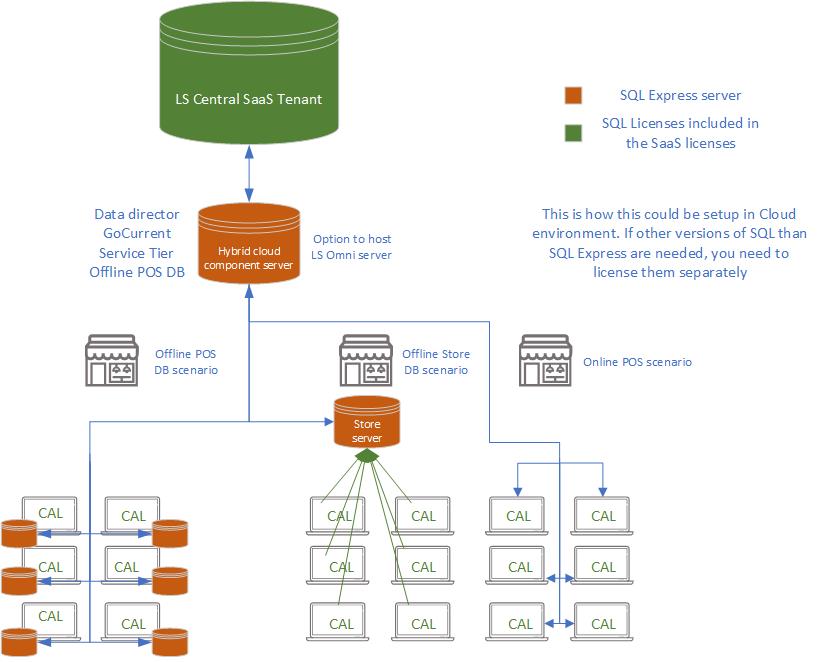
SQL versions when using LS Central SaaS and Dual Right Licenses
Offline POS and Hybrid Cloud component Server
Offline POS can use SQL Express
SQL Express can be used for the Hybrid Cloud Component Server SQL for the BC Service Tier
eCommerce
OmniServer for eCommerce can use SQL Express
The OmniServer could be hosted on the Hybrid Cloud Component Server if the retailer is running Offline POS
OmniServer for Mobile Inventory App
OmniServer for Mobile Inventory App can use SQL Express
The OmniServer could be hosted on the Hybrid Cloud Component Server if the retailer is running Offline POS
LS Insight
Prerequisites are listed here in the LS Insight help, and the Azure Cost Estimate help page has a link at the bottom to an Azure pricing calculator.
- Dynamics 365 Business Central online help
- LS Central online help
grid 2 equal - anchor possible
The SaaS Onboarding team is dedicated to supporting and guiding you in your journey to LS Central in SaaS and making you successful in your first SaaS implementation. Below, you will find the steps to take before and upon your first deal being purchased.
1. Before any SaaS license Order
All partners must be an Indirect Reseller under Microsoft’s CSP program at the date of the first cloud license sold. Once your organization is set up in CSP, we will invite you to an introductory Onboarding session for LS Central in SaaS to cover the SaaS basics and answer any questions you might have.
If you missed the invite, please book an onboarding session here
Attending this session has now become mandatory for partners submitting an order for LS Central SaaS.
Prior to ordering any LS Central SaaS license, LS Retail requires that every partner has at least 1 employee certified on CF-900 LS Central SaaS training. Register for Course CF-900 on LS Retail Academy On-demand with "Full access" or "Starter plan".
For additional support after the onboarding session, you can book a meeting here (please make sure to provide as many details as possible so we can prepare for the right support).
Any technical support related to SaaS issues will no longer be provided free of charge unless the mandatory CF-900 certification has been completed.
2. Testing first anchor
When you purchase your first SaaS license and your certification for CF-900 is completed, you will be invited to the Cloud Accelerator Program (CAP) designed to guide our partners in their first LS Central implementations in SaaS.
For any questions between CAP sessions, please contact the local LS Project Manager managing the CAP session.
Please contact LS Retail Partner Operations pops@lsretail.com if you need assistance to add SaaS to your Partner Agreement and to be set up in CSP as Indirect Reseller.
Use the 30-minute session link, and go through the Cloud Accelerator Program.
We're here to support you on your SaaS journey!
The SaaS Onboarding team is dedicated to supporting and guiding you in your journey to LS Central in SaaS and making you successful in your first SaaS implementation. Below, you will find the steps to take before and upon your first deal being purchased.
1. Before any SaaS license Order
All partners must be an Indirect Reseller under Microsoft’s CSP program at the date of the first cloud license sold. Once your organization is set up in CSP, we will invite you to an introductory Onboarding session for LS Central in SaaS to cover the SaaS basics and answer any questions you might have.
If you missed the invite, please book an onboarding session here
Attending this session has now become mandatory for partners submitting an order for LS Central SaaS.
Prior to ordering any LS Central SaaS license, LS Retail requires that every partner has at least 1 employee certified on CF-900 LS Central SaaS training. Register for Course CF-900 on LS Retail Academy On-demand with "Full access" or "Starter plan".
For additional support after the onboarding session, you can book a meeting here (please make sure to provide as many details as possible so we can prepare for the right support).
Any technical support related to SaaS issues will no longer be provided free of charge unless the mandatory CF-900 certification has been completed.
2. Upon your first SaaS license Order
When you purchase your first SaaS license and your certification for CF-900 is completed, you will be invited to the Cloud Accelerator Program (CAP) designed to guide our partners in their first LS Central implementations in SaaS.
For any questions between CAP sessions, please contact the local LS Project Manager managing the CAP session.
Please contact LS Retail Partner Operations pops@lsretail.com if you need assistance to add SaaS to your Partner Agreement and to be set up in CSP as Indirect Reseller.
Use the 30-minute session link, and go through the Cloud Accelerator Program.
We're here to support you on your SaaS journey!
The SaaS Onboarding team is dedicated to supporting and guiding you in your journey to LS Central in SaaS and making you successful in your first SaaS implementation. Below, you will find the steps to take before and upon your first deal being purchased.
1. Before any SaaS license Order
All partners must be an Indirect Reseller under Microsoft’s CSP program at the date of the first cloud license sold. Once your organization is set up in CSP, we will invite you to an introductory Onboarding session for LS Central in SaaS to cover the SaaS basics and answer any questions you might have.
If you missed the invite, please book an onboarding session here
Attending this session has now become mandatory for partners submitting an order for LS Central SaaS.
Prior to ordering any LS Central SaaS license, LS Retail requires that every partner has at least 1 employee certified on CF-900 LS Central SaaS training. Register for Course CF-900 on LS Retail Academy On-demand with "Full access" or "Starter plan".
For additional support after the onboarding session, you can book a meeting here (please make sure to provide as many details as possible so we can prepare for the right support).
Any technical support related to SaaS issues will no longer be provided free of charge unless the mandatory CF-900 certification has been completed.
3. Testing to point to a place lower in a document
When you purchase your first SaaS license and your certification for CF-900 is completed, you will be invited to the Cloud Accelerator Program (CAP) designed to guide our partners in their first LS Central implementations in SaaS.
For any questions between CAP sessions, please contact the local LS Project Manager managing the CAP session.
Please contact LS Retail Partner Operations pops@lsretail.com if you need assistance to add SaaS to your Partner Agreement and to be set up in CSP as Indirect Reseller.
Use the 30-minute session link, and go through the Cloud Accelerator Program.
We're here to support you on your SaaS journey!
The SaaS Onboarding team is dedicated to supporting and guiding you in your journey to LS Central in SaaS and making you successful in your first SaaS implementation. Below, you will find the steps to take before and upon your first deal being purchased.
1. Before any SaaS license Order
All partners must be an Indirect Reseller under Microsoft’s CSP program at the date of the first cloud license sold. Once your organization is set up in CSP, we will invite you to an introductory Onboarding session for LS Central in SaaS to cover the SaaS basics and answer any questions you might have.
If you missed the invite, please book an onboarding session here
Attending this session has now become mandatory for partners submitting an order for LS Central SaaS.
Prior to ordering any LS Central SaaS license, LS Retail requires that every partner has at least 1 employee certified on CF-900 LS Central SaaS training. Register for Course CF-900 on LS Retail Academy On-demand with "Full access" or "Starter plan".
For additional support after the onboarding session, you can book a meeting here (please make sure to provide as many details as possible so we can prepare for the right support).
Any technical support related to SaaS issues will no longer be provided free of charge unless the mandatory CF-900 certification has been completed.
2. Upon your first SaaS license Order
When you purchase your first SaaS license and your certification for CF-900 is completed, you will be invited to the Cloud Accelerator Program (CAP) designed to guide our partners in their first LS Central implementations in SaaS.
For any questions between CAP sessions, please contact the local LS Project Manager managing the CAP session.
Please contact LS Retail Partner Operations pops@lsretail.com if you need assistance to add SaaS to your Partner Agreement and to be set up in CSP as Indirect Reseller.
Use the 30-minute session link, and go through the Cloud Accelerator Program.
We're here to support you on your SaaS journey!
test faq as index
Yes, customers can have more than one partners supporting them. Any partner that has a Microsoft Partner ID (MPN ID) and has already enrolled in the Cloud Solution Provider (CSP) program can send a GDAP request to the customer, it is then up to the customer to accept or decline the request. More information on the process of requesting GDAP access here.
- For information on cloud solution licensing and availability see the FAQ’s here https://portal.lsretail.com/Partner-Essentials/Cloud-Solutions-licensing-and-availability
- For information on placing an order and operational guidelines, see here: https://portal.lsretail.com/Partner-Essentials/Operational-Guidelines
The same goes for LS Central data as for Dynamics 365 Business Central Data. The customer does not take backups, backups are part of the cloud services.
Partners always provide first support for their customers
When needed, partners create support requests to LS Retail’s support channel
https://portal.lsretail.com/Submit-Request
Please make sure you select type LS Central SaaS
-
Partners cannot change the code in LS Central in-cloud
-
Partners can create per-tenant extensions on top of LS Central in-cloud
-
Partners have access to a powershell script to set up local Docker containers with the same environment as is in the cloud for developing extensions:
https://portal.lsretail.com/Products/LS-Central-LS-Nav/Downloads/LS-Central-in-cloud-test-environment -
Microsoft documentation on how to create extensions: https://learn.microsoft.com/en-us/dynamics365/business-central/dev-itpro/developer/devenv-dev-overview
-
If you want to upload a customized App for your customer then you need to have that in the open object range 50.000-99.999.
Then you are able to upload the Extension. Go to Extensions, Manage, and select Upload Extension.
- Users can personalize their workspace
- https://docs.microsoft.com/en-us/dynamics365/business-central/ui-personalization-user
- Yes , partners and customer can add extensions from AppSource
SQL versions when using LS Central SaaS and Dual Right Licenses
Offline POS and Hybrid Cloud component Server
Offline POS can use SQL Express
SQL Express can be used for the Hybrid Cloud Component Server SQL for the BC Service Tier
eCommerce
OmniServer for eCommerce can use SQL Express
The OmniServer could be hosted on the Hybrid Cloud Component Server if the retailer is running Offline POS
OmniServer for Mobile Inventory App
OmniServer for Mobile Inventory App can use SQL Express
The OmniServer could be hosted on the Hybrid Cloud Component Server if the retailer is running Offline POS
LS Insight
Prerequisites are listed here in the LS Insight help, and the Azure Cost Estimate help page has a link at the bottom to an Azure pricing calculator.
- Dynamics 365 Business Central online help
- LS Central online help
The SaaS Onboarding team is dedicated to supporting and guiding you in your journey to LS Central in SaaS and making you successful in your first SaaS implementation. Below, you will find the steps to take before and upon your first deal being purchased.
1. Before any SaaS license Order
All partners must be an Indirect Reseller under Microsoft’s CSP program at the date of the first cloud license sold. Once your organization is set up in CSP, we will invite you to an introductory Onboarding session for LS Central in SaaS to cover the SaaS basics and answer any questions you might have.
If you missed the invite, please book an onboarding session here
Attending this session has now become mandatory for partners submitting an order for LS Central SaaS.
Prior to ordering any LS Central SaaS license, LS Retail requires that every partner has at least 1 employee certified on CF-900 LS Central SaaS training. Register for Course CF-900 on LS Retail Academy On-demand with "Full access" or "Starter plan".
For additional support after the onboarding session, you can book a meeting here (please make sure to provide as many details as possible so we can prepare for the right support).
Any technical support related to SaaS issues will no longer be provided free of charge unless the mandatory CF-900 certification has been completed.
2. Upon your first SaaS license Order
When you purchase your first SaaS license and your certification for CF-900 is completed, you will be invited to the Cloud Accelerator Program (CAP) designed to guide our partners in their first LS Central implementations in SaaS.
For any questions between CAP sessions, please contact the local LS Project Manager managing the CAP session.
Please contact LS Retail Partner Operations pops@lsretail.com if you need assistance to add SaaS to your Partner Agreement and to be set up in CSP as Indirect Reseller.
Use the 30-minute session link, and go through the Cloud Accelerator Program.
We're here to support you on your SaaS journey!
We kick off each bucket with an email to all the partners in that bucket - that have SaaS or hybrid customers on the Embed LS Retail cluster.
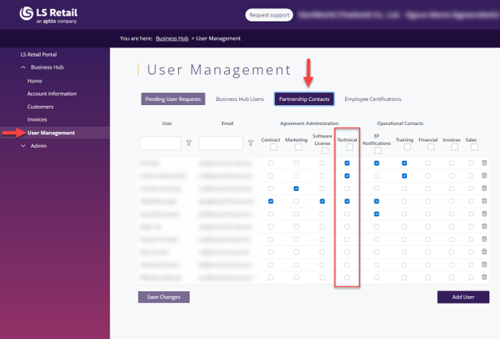
The email is sent to the person/people who are registered as the Technical contact in the Business Hub on the LS Retail portal.
- You can check who this is in your company in the Business Hub under User Management > click on Partnership Contacts and look at the Technical column.
Yes.
Partners can request to be moved to a different bucket or move some customers to a later bucket.
We will not move any customer environments without a request from the partner.
Please reach out to us through the LS - Technical Support service desk.
What will not change:
- Ownership will not change.
- Changes related to access to data will not change.
- Databases will stay as they are.
- Oauth authentication app configuration will not change.
What will change:
- LS Retail will no longer control the upgrade flow in the same detail as before.
- In rare cases, environments will be moved to a new Azure region to align with BC-hosted environments.
- Security is higher in the new environments as AL code cannot invoke external DLL's
- The service is changed from embed to BC public cloud. This means that the base URL will change from lscentral.bc.dynamics.com to businesscentral.dynamics.com
LS Central Version
- The environment needs to be on LS Central latest available version for your country. The move will fail if the environment is on an older version.
Production Environments
- Check if there is already a Production environment in the BC Admin Center where the Application Family = Business Central. We have seen that in some cases these were created by mistake.
- Before the move, either remove the environment or rename it so it is not the same as the Production environment that is going to be moved.
- If that has not been done then Microsoft will add "-BC" to the environment name. Meaning that the name of the environment being moved doesn't change.
- Please make you and your customers aware of this as otherwise, they can expect to be charged for two Production environments.
Change the URL
- With the move, the base URL will change from lscentral.bc.dynamics.com to businesscentral.dynamics.com.
- We recommend switching to the new URL and that you update this for your customers as Microsoft will redirect for a limited time only. We do not have a date for how long the redirects will work, so we advise you to update this within the next two months after moving the production.
- Note that the URL need to be specific
PowerBi Reports
- With the move, the Application Family changes from LSCentral to BusinessCentral. If the customer has Power BI reports that use the Dynamics BC 365 connector in Power BI then you need to make a change in the connection code for each table in the report.
- Open Transform data from the ribbon, Select the table you want to change from the left menu, and select Navigation from the right menu, an error will appear.
- With the Navigation selected on the right, click Advanced Editor from the top menu. This opens the Advanced Editor dialog.
- From the Advanced Editor remove (lscentral) from the name of the environment – leaving only the actual environment name (capitalized).
- Click Done.
- A preview of the data should load and you can select Close & Apply from the ribbon to close Transform data and return to the report.
The duration of the move depends on the number of companies and number of extensions in the environment. Data size should not be an issue. In general, the move should not take longer than a normal environment upgrade.
You can look up how long your last customer upgrade took, by logging into the Admin Center for the specific customer and click on Operations.
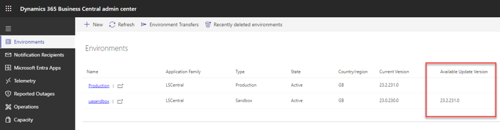
Once an environment has been moved you will see in the BC Admin Center that the Application Family has changed from LSCentral to Business Central.
Below is an example of PublicCloud sandbox that has been moved over.
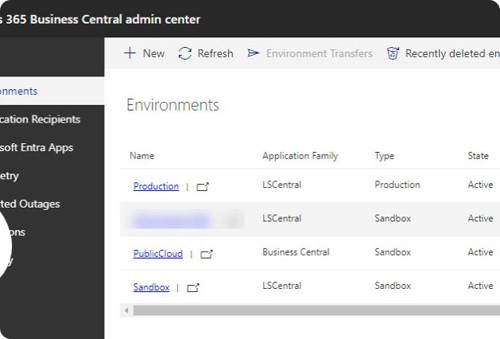
- The environments will be moved within the agreed date that you, the partner, and your customer have confirmed to be the optimal date.
- The move will happen within the Upgrade Window as it is set in the Admin Center for each environment.
- For customers that have not gone live, you can request the move to be scheduled outside the Upgrade window.
- Partners with multiple customers can request to split the move of their customers between days if they do not wish to move all customers on the same day.
- Partner can also ask all or some of their customers to be moved to a different bucket.
The app ID is the same but the names for the language Apps and local functionality Apps will change as of version 23.0
Sandboxes named “PublicCloud” are moved daily. You can start testing the sandbox the day after it was created. If you want to confirm that the environment has been moved, you can look at the Application Family in the Admin Center, it should say Business Central for the public cloud instead of LSCentral.
Each bucket spans four weeks. We recommend following this guideline:
- Week 1: Reach out to customers and create the sandboxes
- Week 2 - 3: Do your testing and decide on when you want to move your customers
- Week 4: Move your customers' Production environments and remaining sandboxes(if any)
All issues related to the move will get our highest priority. Please submit a support ticket through our LS - Technical Support service desk.
Please be sure to mention that the issue has surfaced with the move to the BC public cloud.
When moving from the embed cloud to the BC public cloud, the database stays intact but the service is changed from embed to BC public cloud.
- This means that the base URL will change from https://lscentral.bc.dynamics.com
to https://businesscentral.dynamics.com - The current integration URL (web service URL) will still work; it will be redirected to the new URL. We recommend switching to the new URL and that you update this for your customers as Microsoft will redirect for a limited time only. We do not have a date for how long the redirects will work, so we advise you to update this within the next two months after moving the production.
Note that the URL needs to be specific:
- Not re-routed
- Will be re-routed
- https://lscentral.bc.dynamics.com/Production
- https://lscentral.bc.dynamics.com/Production?company=[company]
- https://lscentral.bc.dynamics.com/[tenant id]/Production?company=[company]
No, you do not need to set up a new app or change any configuration in an existing Azure app. The clients connecting to the moved environment will continue to work.
With the move, the Application Family changes from LSCentral to BusinessCentral. If the customer has Power BI reports that use the Dynamics BC 365 connector in Power BI then you need to make a change in the connection code for each table in the report.
- Open Transform data from the ribbon, Select the table you want to change from the left menu and select Navigation from the right menu, an error will appear.
- With the Navigation selected on the right, click Advanced editor from the top menu. This opens the Advanced editor dialog.
- From Advanced editor remove (lscentral) from the name of the environment – leaving only the actual environment name (capitalized).
- Click Done.
- A preview of the data should load and you can select Close & Apply from the ribbon to close Transform data and return to the report.
2. Upon your first SaaS license Order
When you purchase your first SaaS license and your certification for CF-900 is completed, you will be invited to the Cloud Accelerator Program (CAP) designed to guide our partners in their first LS Central implementations in SaaS.
For any questions between CAP sessions, please contact the local LS Project Manager managing the CAP session.
Please contact LS Retail Partner Operations pops@lsretail.com if you need assistance to add SaaS to your Partner Agreement and to be set up in CSP as Indirect Reseller.
Use the 30-minute session link, and go through the Cloud Accelerator Program.
We're here to support you on your SaaS journey!
Testing to use FAQ as an index on right side
The SaaS Onboarding team is dedicated to supporting and guiding you in your journey to LS Central in SaaS and making you successful in your first SaaS implementation. Below, you will find the steps to take before and upon your first deal being purchased.
1. Before any SaaS license Order
All partners must be an Indirect Reseller under Microsoft’s CSP program at the date of the first cloud license sold. Once your organization is set up in CSP, we will invite you to an introductory Onboarding session for LS Central in SaaS to cover the SaaS basics and answer any questions you might have.
If you missed the invite, please book an onboarding session here
Attending this session has now become mandatory for partners submitting an order for LS Central SaaS.
Prior to ordering any LS Central SaaS license, LS Retail requires that every partner has at least 1 employee certified on CF-900 LS Central SaaS training. Register for Course CF-900 on LS Retail Academy On-demand with "Full access" or "Starter plan".
For additional support after the onboarding session, you can book a meeting here (please make sure to provide as many details as possible so we can prepare for the right support).
Any technical support related to SaaS issues will no longer be provided free of charge unless the mandatory CF-900 certification has been completed.
2. Upon your first SaaS license Order
When you purchase your first SaaS license and your certification for CF-900 is completed, you will be invited to the Cloud Accelerator Program (CAP) designed to guide our partners in their first LS Central implementations in SaaS.
For any questions between CAP sessions, please contact the local LS Project Manager managing the CAP session.
Please contact LS Retail Partner Operations pops@lsretail.com if you need assistance to add SaaS to your Partner Agreement and to be set up in CSP as Indirect Reseller.
Use the 30-minute session link, and go through the Cloud Accelerator Program.
We're here to support you on your SaaS journey!
Key #1: Prepare Your Development and Delivery Teams
Key #2: Prepare Your Support Team
Key #3: Prepare Your Sales Team
Index 2
test
blue
blueblue
4-4-4 layout
far left
4-4-4 layout
LS subheader
4-4-4 layout
far right
card test
testing how this looks with a 4-4-4 layout. does the text wrap or what happens? no color selected for shape
another card
what if we add another card here below?
third card
<a href="https://www.youtube.com/watch?v=hrhxN3rGjXk&t=125s</a>
large card
511 character max, it needs to be set up and configured with the customer master data. In the LS Central Implementation Guide you can find an outline to implement LS Central, which includes: Recommended timeline for training. Package table data, including import methods. Important criteria when implementing areas of LS Central. Data setup and configuration The guide comes with data packages with the minimum required setup to run a retail store. It includes setup for G/L accounts,
fdfd
fdf
fgdfd