LS Central SaaS Onboarding Guide
Yes, customers can have more than one partners supporting them. Any partner that has a Microsoft Partner ID (MPN ID) and has already enrolled in the Cloud Solution Provider (CSP) program can send a GDAP request to the customer, it is then up to the customer to accept or decline the request. More information on the process of requesting GDAP access here.
- For information on cloud solution licensing and availability see the FAQ’s here https://portal.lsretail.com/Partner-Essentials/Cloud-Solutions-licensing-and-availability
- For information on placing an order and operational guidelines, see here: https://portal.lsretail.com/Partner-Essentials/Operational-Guidelines
The same goes for LS Central data as for Dynamics 365 Business Central Data. The customer does not take backups, backups are part of the cloud services.
Partners always provide first support for their customers
When needed, partners create support requests to LS Retail’s support channel
https://portal.lsretail.com/Submit-Request
Please make sure you select type LS Central SaaS
-
Partners cannot change the code in LS Central in-cloud
-
Partners can create per-tenant extensions on top of LS Central in-cloud
-
Partners have access to a powershell script to set up local Docker containers with the same environment as is in the cloud for developing extensions:
https://portal.lsretail.com/Products/LS-Central-LS-Nav/Downloads/LS-Central-in-cloud-test-environment -
Microsoft documentation on how to create extensions: https://learn.microsoft.com/en-us/dynamics365/business-central/dev-itpro/developer/devenv-dev-overview
-
If you want to upload a customized App for your customer then you need to have that in the open object range 50.000-99.999.
Then you are able to upload the Extension. Go to Extensions, Manage, and select Upload Extension.
- Users can personalize their workspace
- https://docs.microsoft.com/en-us/dynamics365/business-central/ui-personalization-user
- Yes , partners and customer can add extensions from AppSource
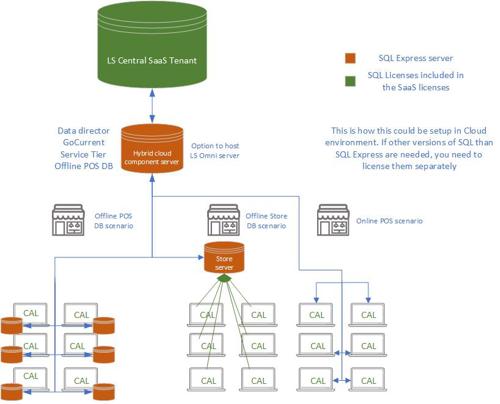
SQL versions when using LS Central SaaS and Dual Right Licenses
Offline POS and Hybrid Cloud component Server
Offline POS can use SQL Express
SQL Express can be used for the Hybrid Cloud Component Server SQL for the BC Service Tier
eCommerce
OmniServer for eCommerce can use SQL Express
The OmniServer could be hosted on the Hybrid Cloud Component Server if the retailer is running Offline POS
OmniServer for Mobile Inventory App
OmniServer for Mobile Inventory App can use SQL Express
The OmniServer could be hosted on the Hybrid Cloud Component Server if the retailer is running Offline POS
LS Insight
Prerequisites are listed here in the LS Insight help, and the Azure Cost Estimate help page has a link at the bottom to an Azure pricing calculator.
- Dynamics 365 Business Central online help
- LS Central online help
Yes, customers can have more than one partners supporting them. Any partner that has a Microsoft Partner ID (MPN ID) and has already enrolled in the Cloud Solution Provider (CSP) program can send a GDAP request to the customer, it is then up to the customer to accept or decline the request. More information on the process of requesting GDAP access here.
- For information on cloud solution licensing and availability see the FAQ’s here https://portal.lsretail.com/Partner-Essentials/Cloud-Solutions-licensing-and-availability
- For information on placing an order and operational guidelines, see here: https://portal.lsretail.com/Partner-Essentials/Operational-Guidelines
The same goes for LS Central data as for Dynamics 365 Business Central Data. The customer does not take backups, backups are part of the cloud services.
Partners always provide first support for their customers
When needed, partners create support requests to LS Retail’s support channel
https://portal.lsretail.com/Submit-Request
Please make sure you select type LS Central SaaS
-
Partners cannot change the code in LS Central in-cloud
-
Partners can create per-tenant extensions on top of LS Central in-cloud
-
Partners have access to a powershell script to set up local Docker containers with the same environment as is in the cloud for developing extensions:
https://portal.lsretail.com/Products/LS-Central-LS-Nav/Downloads/LS-Central-in-cloud-test-environment -
Microsoft documentation on how to create extensions: https://learn.microsoft.com/en-us/dynamics365/business-central/dev-itpro/developer/devenv-dev-overview
-
If you want to upload a customized App for your customer then you need to have that in the open object range 50.000-99.999.
Then you are able to upload the Extension. Go to Extensions, Manage, and select Upload Extension.
- Users can personalize their workspace
- https://docs.microsoft.com/en-us/dynamics365/business-central/ui-personalization-user
- Yes , partners and customer can add extensions from AppSource
SQL versions when using LS Central SaaS and Dual Right Licenses
Offline POS and Hybrid Cloud component Server
Offline POS can use SQL Express
SQL Express can be used for the Hybrid Cloud Component Server SQL for the BC Service Tier
eCommerce
OmniServer for eCommerce can use SQL Express
The OmniServer could be hosted on the Hybrid Cloud Component Server if the retailer is running Offline POS
OmniServer for Mobile Inventory App
OmniServer for Mobile Inventory App can use SQL Express
The OmniServer could be hosted on the Hybrid Cloud Component Server if the retailer is running Offline POS
LS Insight
Prerequisites are listed here in the LS Insight help, and the Azure Cost Estimate help page has a link at the bottom to an Azure pricing calculator.
- Dynamics 365 Business Central online help
- LS Central online help
 Useful links
| LS Nav (2018) on Dyn NAV |
LS Central on-premises |
LS Central SaaS |
|
| Availability | No longer available for new customers. Existing LS Nav 2018 customers may continue to purchase into their licenses as needed. As of October 1, 2019, LS Nav subscription customers will be moved to the new pricing structure of the LS Nav on Business Central on-premises Subscription Pricelist. Please see the LS Central localization overview for current and upcoming country availability. |
Released November 19, 2018 For our localization partners it is business as usual to provide the localized version. Please see the LS Central localization overview for current and upcoming country availability. |
Released beginning July 2019 in selected countries. Please see the LS Central localization overview for current and upcoming country availability. |
| Channel | DPL (Dynamics Price List) | DPL (Dynamics Price List) |
CSP (Cloud Solution Provider) |
| Deployment |
On-premises Private cloud |
On-premises Private cloud |
In Cloud |
| Licensing |
Perpetual |
Perpetual Subscription (for partner managed deployment) |
Subscription (Microsoft managed cloud deployment) |
| User types | Concurrent users for perpetual. Named users for subscription (access licenses are specific to an individual and cannot be shared). |
Named users for both perpetual and subscription (access licenses are specific to an individual and cannot be shared). | Named users (access licenses are specific to an individual and cannot be shared) |
| Transition Upgrade from LS Nav on Dyn NAV |
n/a |
LMT Upgrade Path for Perpetual, MBL and BRL licenses. Each Dyn NAV Full User and Dyn Nav Full User – Limited Upgrade licensed prior to May 1, 2019 maps to three (3) Dyn 365 Business Central Full Users. Each Dyn NAV Full User – Limited upgrade licensed on or after May 1, 2019 maps to one (1) Dyn 365 Business Central Full User. Each Dyn NAV Limited Users and Dyn NAV Limited User – Limited Upgrade licensed prior to May 1, 2019 maps to three (3) Dyn 365 Business Central Team Members Limited User – Limited Upgrade licensed on or after May 1, 2019 maps to 1 (one) Dyn 365 Business Central Team Member |
Cloud offer available |
| Pricing |
Mostly as we know it today New purchased perpetual users have limited upgrade See LS Nav on Dynamics NAV perpetual and subscription pricelists on LS Retail Portal. |
See LS Nav on Business Central on-premises perpetual and subscription pricelists on LS Retail Portal. |
See LS Central in-cloud subscription pricelists on LS Retail Portal. |
| Off-line POS? |
Yes |
Yes |
Yes |
| LS Pay availability | All versions of LS Nav use the same version of LS Pay – hence there is no difference in supported PSPs for different versions of LS Nav. | All versions of LS Central/LSNav use the same version of LS Pay – hence there is no difference in supported PSPs for different versions. | All versions of LS Central/LSNav use the same version of LS Pay – hence there is no difference in supported PSPs for different versions. |
| Limitations |
n/a | n/a |
LS Loss Prevention is not available in-cloud for LS Central |